

The Inventory Bug
As many of you on ASA servers are already aware, we are currently battling a bug causing some players to lose items or entire inventories during server restarts.
Over the past week we’ve implemented a number of mitigation strategies in an attempt to reduce or completely eliminate the issue while we continue investigating the root cause.
One of those additions is the new Force Inventory Save feature.
If you press [ESC] in-game, you’ll now see a Force Inventory Save button. Before logging off, we strongly recommend using this feature so that, should you experience a significant inventory loss, admins have a much greater chance of restoring your items.
We also highly recommend the use of a log-off chest before disconnecting.
This has been considered good practice ever since the ASE days, which is one of the reasons the Log-Off Storage item originally existed in Genesis 2. For the time being, our recommendation is simple:
- Save your inventory using the new button
- Place important items into your log-off chest before disconnecting
Alongside the inventory saver system, we’ve also been making significant backend changes to how the cluster handles automated restarts.
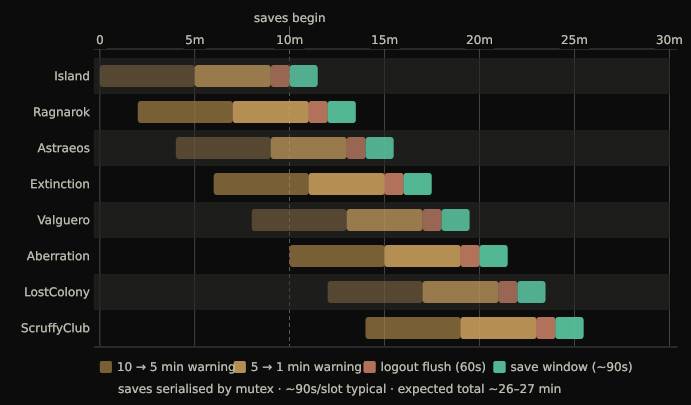
Odium has been hard at work developing and testing a custom RCON Scheduled Save Cascade system, which takes over the whole restart process from our ASM, separating each server’s save and shutdown process by two-minute intervals, and handling the execution of saveWorld and doExit commands to ensure a server doesn’t shut down until the save process has fully completed.
The goal is to address possible interruption of the saveWorld procedure and dramatically reduce I/O load by ensuring that only one server is saving and shutting down at a time instead of the entire cluster attempting to do so simultaneously.
At the time of writing, the code which powers it is now in its third major iteration.
Unfortunately, while improvements have been observed, we are still receiving occasional reports of item loss, meaning the issue has not yet been fully resolved.
We have also been working directly with the developer of the server manager software we use, who recently implemented a new shutdown method which force-kills the server process after the save completes, rather than relying solely on the standard saveWorld → doExit sequence. This is being tested as another possible workaround for the timing issues introduced in recent ARK updates.
In the meantime, we continue running extensive backend testing, researching community reports, and experimenting with additional solutions wherever possible.
Your feedback genuinely helps.
Whether your login was successful or problematic, reports from players help us determine whether the changes we’re making are moving us in the right direction.
We’ll continue doing everything we can to fight this issue, keep the community informed, and improve stability across the cluster.
Thank you for your patience and support while we work through it together.